Still writing notes at 9pm?
Finish the note.
Speak or type what happened straight after the session. Check the draft and its linked sources, then finalise it.
For allied health and NDIS providers
Talk it through, approve the draft. Noteable keeps what works and what to watch for with each client, so whoever sees them next starts where you left off. Every point links to its source.
Free personal setup: send your headings and we’ll set up your note format.
14 days free from your first generated draft. No card. No call to book. You review every note.
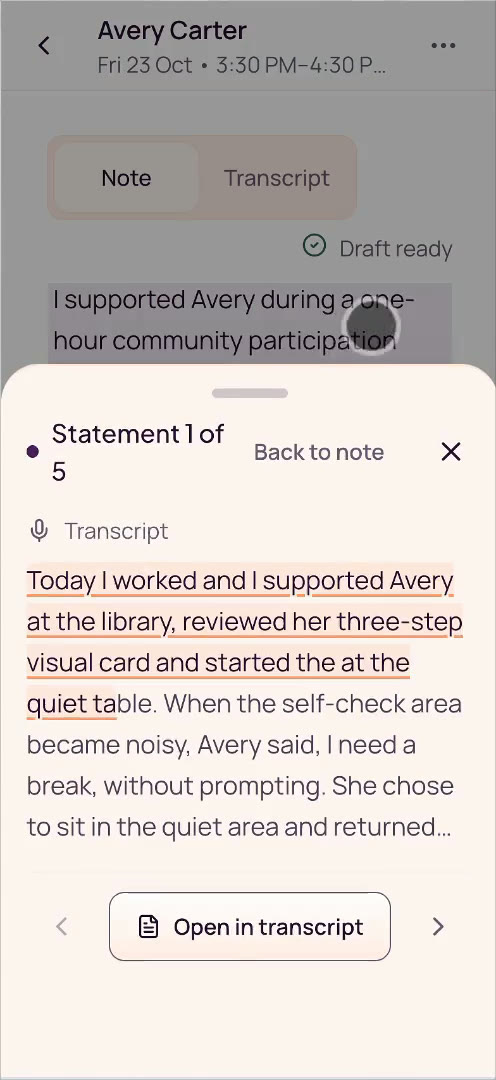
Avery’s fictional library session starts with earlier client context. The user records a recap and stops; a draft then appears. It describes Avery asking for a break when self-check becomes noisy, returning after three minutes with reassurance, and packing up with one verbal prompt. A progress paragraph compares this with earlier returns of four to five minutes. Numbered markers open transcript excerpts. The user selects Save session note, a plan goal, then Confirm & Finalise. The silent clip is edited and does not show the complete source history.
Still writing notes at 9pm?
Speak or type what happened straight after the session. Check the draft and its linked sources, then finalise it.
Scrolling back through old notes before a session?
Before the next visit, open the client brief: available finalised notes, confirmed details and recorded follow-ups in one place.
Asked for a record that’s spread across notes and messages?
Return to the reviewed note, inspect its linked sources and revision history, and export a record when you need it.
Remember what matters
A draft can compare today’s recap with the client’s earlier finalised notes. Each statement links to its source, so you can check it before you finalise.
Today (23 October), Avery requested a break without prompting and returned after approximately three minutes with reassurance.
The notes dated 21 September and 7 October record independent break requests and returns after approximately five and four minutes respectively, with reassurance and modelled slow breathing. The recorded return time was shorter in each of these three library sessions. This does not establish a lasting change. Reassurance was still needed today; it is not yet clear how this would go on a busier day.
[1] Today’s transcript · 23 Oct 2026
“She came back after about three minutes. With that reassurance, yes.”
[2] Earlier note · 21 Sep 2026
“…requested a break when the library became noisy. … She returned after approximately five minutes with co-regulation.”
[3] Earlier note · 7 Oct 2026
“…modelled slow breathing. She returned after approximately four minutes with co-regulation.”
Fictional three-session example · today’s recap and earlier notes remain separate sources.
Free personal setup
Tell me about your work and the headings you need. I’ll help you set up a note format, then walk you through your first note. Free for new accounts while Noteable is early.
Free before you pay. No call to book. Share up to 12 headings only — no client information or file uploads.
Try Noteable freeAfter signup, open Settings → Personal setup. Prefer to set it up yourself? Choose “I’ll do it myself”.
Help adding clients is scoped separately; moving records isn’t included. Connecting your calendar is optional, after your core setup.
You don’t need a discounted plan to get free setup. Any offer already agreed with us keeps its terms.
Automatic next-session brief
You review and finalise the note. When you or an authorised colleague opens the next-session brief, Noteable automatically brings together the available finalised notes, confirmed details, recorded follow-ups and current goals.
No extra brief to generate. Open the brief and check it before the next visit. Each person sees only the clients and information they’re permitted to access.
Watch a team handover exampleA few practical details
Yes. Noteable is web-based. On your phone, you can speak a recap or type it, then review, edit and finalise the draft.
A note can compare today’s session with earlier records in Progress on goals. Check the linked sources and their dates so a previous observation is not mistaken for something that happened today. The fictional example separates the 23 October transcript from the notes dated 21 September and 7 October.
No. Keep billing and claiming in your practice suite. Noteable handles session notes, client context and reports. Client records do not sync between the two.
You do. Review the wording and linked sources, correct what needs changing, then finalise. Noteable does not guarantee compliance or submit NDIA claims; you remain responsible for the record and the requirements that apply to your work.
Base costs A$29 per active user per month, including GST. Your 14 days start with your first generated draft. No card required. After the trial, your workspace becomes read-only until the owner upgrades. See pricing and plan details.
Ready to see it?
Send us your headings and we’ll set up your note format before your first note. Or start straight away on your own.
Try Noteable free14 days free from your first generated draft. No card. No call to book. You review every note.