Skip to content

Spreadsheet

Noteable vs spreadsheets

Keep the sheet for a tiny tracker. Move when notes, follow-ups and another worker no longer fit in tabs.

A spreadsheet is not a bad product. It is a good tool used past the point where session notes, follow-ups and a second pair of hands need one record. Noteable is for after that point — not for shaming a working tracker.

Choose Noteable if…

When Noteable is the better fit

  • Session notes live in Docs or email, goals live in a sheet, and you reconstruct reports from both.
  • Follow-ups die between sessions because nobody owns the next-time column in real time.
  • A second worker is about to see the client and should not start from your head.

Choose Spreadsheets if…

When Spreadsheets is the better fit

  • You have one owner, a handful of rows, and a single metric to track.
  • The sheet is a temporary stopgap while you choose a record — and you know that.
  • The work does not depend on session-level detail or handover.

Where the difference shows up

Eight clients, then a covering shift

You have eight NDIS clients. Session notes are in Google Docs. Goals are in a spreadsheet. Follow-ups are in your phone. A colleague covers Sam on Friday.

In Noteable

Sam’s recap is captured once. Friday’s worker opens the client and sees last time, the budgeting follow-up, and the goal — then writes their own session.

With Spreadsheets

You paste a line into the sheet after the fact. Friday’s worker gets a folder link and three unread docs. That can still work at two clients. It usually fails at eight plus cover.

At a glance

Decision-relevant differences

Horizontal comparison table. Focus this region, then use arrow keys or scroll to see every column.

Where Noteable and Spreadsheets differ
AreaNoteableSpreadsheets
Designed to doStructured session notes with client context you can hand to the next worker.Manual tracking and lightweight tables. Excellent at counts. Weak at session narrative.
Session contextCaptured inside the session record while it is still true.Usually summarised after the fact, or omitted.
Follow-upsNext-time items sit with the client, visible before the next session.Depends on whoever updated the next-action column last.
Second workerSame client record, with team session planning and controlled calendar sharing.Sharing a sheet is easy. Sharing judgment that never made it into a cell is not.
Who changed whatThe product keeps who changed the record and when.Cell history if you remember to use it; often none that a covering worker will trust.
InvoicingNot the job. Keep invoicing where it already works.A spreadsheet is not a billing system — and should not be asked to become one.
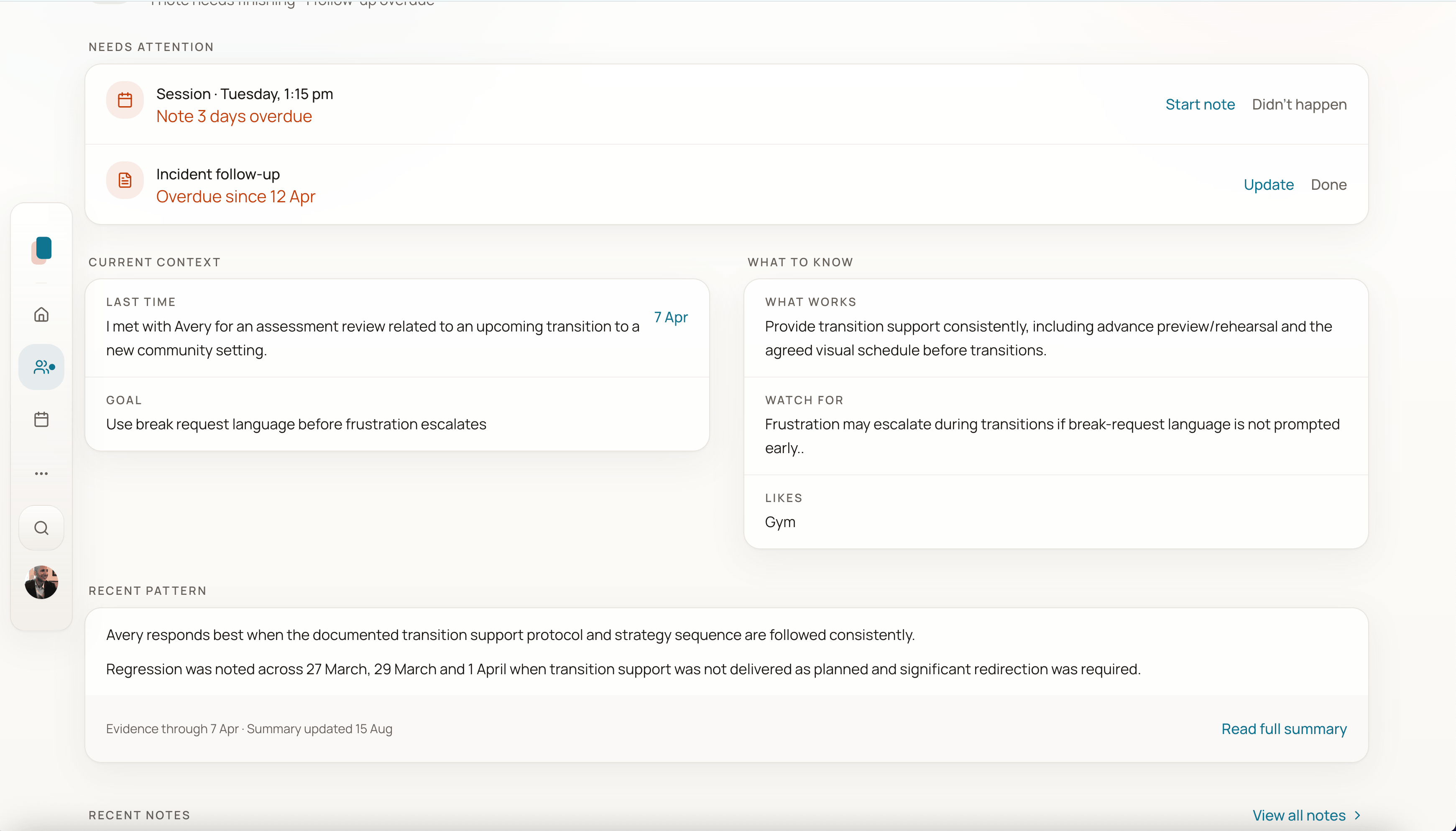
Client home with current context, what to know, and recent pattern before the next session.
Next session starts from this client’s context, not a blank page.

In the product

The breaking point is cover, not the first tab

When another worker has to see what happened last time, a folder of sheets is usually already too late.

Next step

Move one client off the sheet

Finish a real session note for the client whose follow-ups currently live in your phone.