Skip to content

Practice manager

Noteable vs Splose

Keep Splose for operations. Add Noteable when session notes, context and handover are still the weak point.

These products are complementary more often than they are rivals. Splose is allied health practice management. Noteable is session documentation and client context beside that system — not a second invoicing platform.

Choose Noteable if…

When Noteable is the better fit

  • Bookings and invoices already work in Splose (or similar), but session notes still get written late or handed over poorly.
  • Covering workers still start from a blank page even though the practice system has a client file.
  • You want voice or typed capture into a structured draft you review, without moving billing into another platform.

Choose Splose if…

When Splose is the better fit

  • You need scheduling, online bookings, forms, CRM, telehealth, and billing in one practice system.
  • NDIS bulk upload, batch invoicing, and payment processing are the job to solve first.
  • Progress notes inside the practice suite are enough, and you do not have a separate documentation gap.

Where the difference shows up

Operations are fine. Friday cover is not.

Splose already holds Sam’s bookings and invoices. You still type session notes at night, and the worker covering Friday does not see last week’s spreadsheet follow-up.

In Noteable

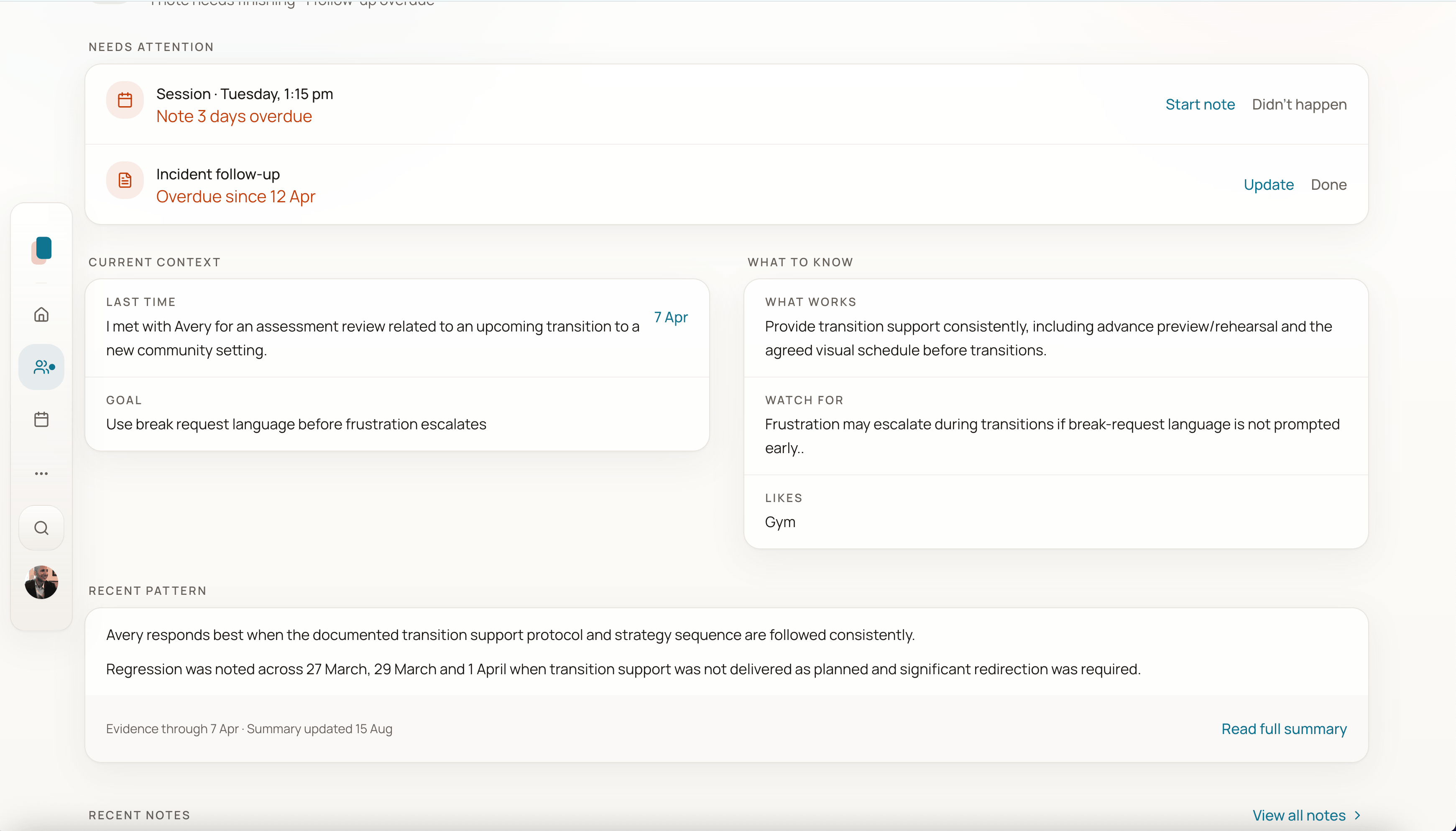
Keep Splose for the calendar and the claim. Capture the session in Noteable. Friday’s worker opens Sam and sees last time, the follow-up, and the goal — then writes their own note.

With Splose

Stay in Splose for the whole file, including progress notes and Splose AI if you buy the add-on. That is the right call when notes-inside-the-practice-system are already good enough.

At a glance

Decision-relevant differences

Horizontal comparison table. Focus this region, then use arrow keys or scroll to see every column.

Where Noteable and Splose differ
AreaNoteableSplose
Designed to doSession documentation, client context, and exportable records beside existing admin.Allied health practice management: calendar, notes, CRM, forms, telehealth, invoicing, reporting.
Scheduling and bookingsOne-off and repeating session planning, plus selected read-only calendar connections. Keep public bookings in your existing tools.Core platform capability, including online bookings and waitlist tools.
Billing and claimingNot the job. Claiming and invoicing stay in your billing tool.Core platform capability, including NDIS bulk upload on the public pricing page.
Session documentationVoice or typed capture into a structured draft. Human review before final.Progress notes, with optional Splose AI for dictation, notes and reports (add-on).
Handover contextLast time, what works, and follow-ups sit on the client record for the next worker.Operational client records inside the practice system. Whether that matches your handover standard is a trial question, not a guess.
Public price band (25 August 2026)A$29 per active user per month.A$27 per practitioner per month for the platform (non-practitioner roles free) plus A$27 per user per month for Splose AI, excluding GST, on splose.com/pricing.
Client home with current context, what to know, and recent pattern before the next session.
Next session starts from this client’s context, not a blank page.

In the product

The gap is usually Friday’s worker, not the invoice

If Splose already runs the calendar, the missing piece is often what happened last session. That is the client record Noteable keeps.

Next step

Keep Splose. Test the documentation gap.

Finish one real session note in Noteable and see whether Friday’s cover still starts from zero.