Skip to content

NDIS documentation software

The office already runs. Thursday still starts from zero.

You already roster the week and raise the invoice. The gap is the record — what happened, and what Thursday’s worker needs to know.

14-day trial, no card. The snapshot is a scored self-assessment in the app.

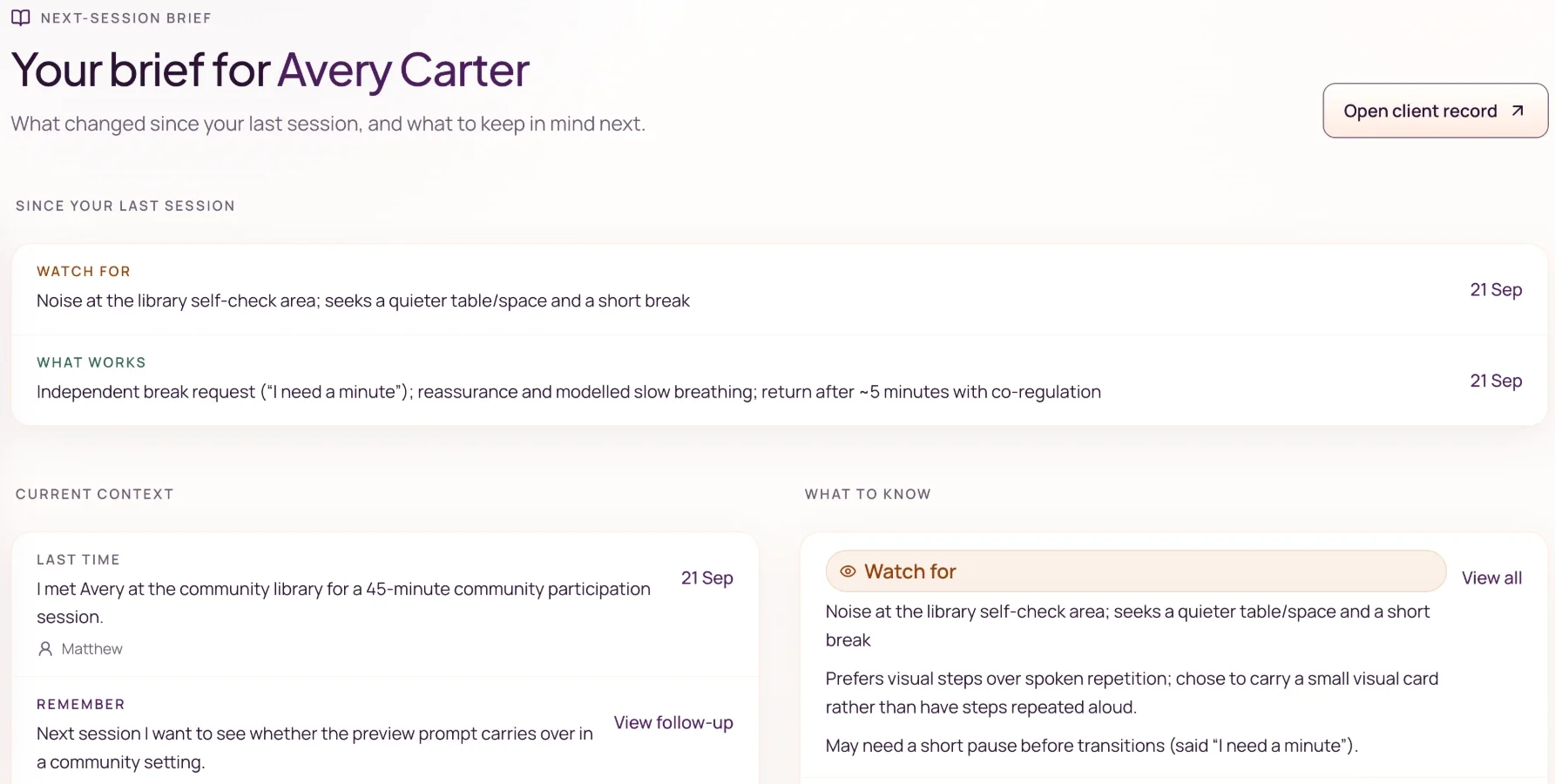
Client home with current context, what to know, and recent pattern before the next session.
Last time, what works, and what to be mindful of sit with the client before the next worker opens the file.

In the product

The covering worker opens the same client.

Monday’s note is reviewed, finalised, and sits on Sam’s record. Thursday’s worker opens that file, sees the follow-up, and writes Thursday.

Bookings and invoices already have a home. The session record does not.

NDIS software already runs bookings, invoices, and claiming. Documentation software has one job: hold what happened, and what still matters next time.

Thursday, a colleague covers Sam — who you saw Monday. All they get is a calendar entry, because Monday’s budgeting follow-up is still only in your head.

A session record the team can share. Not a second office.

Noteable is documentation software for sole traders and small NDIS providers: speak or type a recap, then review a draft that stays with the client. It does not roster, invoice, or submit NDIA claims.

Use Noteable for

  • Voice or typed session capture
  • A structured draft you review before it is final
  • Client context that stays with the client: last time, what works, follow-ups, goals
  • A shared record when another worker sees that client
  • A session or date-range record you can export later

Keep your existing system for

  • Scheduling and rostering
  • Invoicing and NDIA claiming
  • Payroll and accounting
  • Service agreements

Three ways the record usually breaks

Handover left in a message. Notes that never land on the same client. A file that does not survive a change of face.

Next step

Write the first note on a client someone else will see this week.

Write your first note free, then add the colleague who covers this client — the test is whether they open the same record. The 2-minute snapshot is a scored self-assessment in the app, not an export from the clinic.

See Noteable for small teams

FAQ

Documentation software, in plain language

For small NDIS providers who already have admin tools and need the record the next worker opens.

Is Noteable NDIS documentation software?

Yes — for sole traders and small providers. It turns a voice or typed recap into a structured session-note draft, keeps client context between sessions, and holds a record you can export later. It does not replace scheduling, invoicing, or NDIA claiming.

Who is it for?

A small NDIS provider — typically a few people, self-serve up to 15 — who needs the session record to still make sense when another worker steps in. A sole trader can start on the same product; the shared client record is there when the second login arrives.

See Noteable for small teams

Will this replace Splose, Cliniko, or our claiming tool?

No. Keep those. Noteable sits beside them. It is not a native integration and not a second practice-management system.

Does the NDIS require Noteable-style notes?

No. The 2026 NDIS Amendment Bill passed Parliament on 19 August 2026 and is awaiting Royal Assent; implementing rules may still change. Session notes help you show the work. They are not legally required to look like Noteable’s, and Noteable is not an approved NDIS tool.

How is this different from a notes app for one independent worker?

A solo-worker business app is built to run one person’s notes, invoices, and rates. Noteable is built for the session record — including the shared client record when a second worker is added. Invoicing stays where you already do it.

Solo admin vs shared client record

How much does it cost?

A$29 per active user per month. Two workers are A$58. Five are A$145. The 14-day trial starts when you generate your first draft. No credit card. You review every draft before it is final.